Destiny of an Editor
This is a project I started over at Lord Yuan Shu’s forums.
Destiny of an Emperor has long been among my favorite NES games. Once I even thought of changing around officer stats, I knew I wanted to give making an editor a try. The most complicated thing it allows is changing lengths of officer names (since this requires updating pointers).
For right now, Destiny of an Editor is in beta test. You can download beta 0.98d here, but I make no guarantees about how well it will work. It has been tested pretty thoroughly, and so should be stable. You’ll need the .NET framework to use it.
Changelog (since 0.90)
0.98d
-Bugfix for .98c.
…
-Added map editing, portrait loading from the ROM, manual expansion, battle editing, battle taunt/closer editing, improved overall editing stability and such.
0.94
-Added color previews of sprites and portraits
-Fixed manual entry of portrait hex
0.93
-Added toggle for an officer’s immunity to An Sha
-Added toggle for an officer’s inability to be billeted
0.91
-Added ability to sort by officer names or appearance order in ROM
-Added hex of officer (used in battle references, etc)
-Switched portrait values to comboboxes; now no reload is necessary to see the new portrait (customizing portraits is MUCH easier)
-Added About message box
-General UI tweaks (size, placement)
-Better handling of a “reload” (loading a rom without restarting the app)
Also, a newer project, Destiny of a Text Editor, has been in progress over the course of the last several months.
Here is the latest release, 0.04. Though it’s relatively stable (James has been using it a considerable amount) it is still unrefined.
As always, save early and often, and be sure to back-up things too.
Following are a few screenshots of the officer editor and some test results.
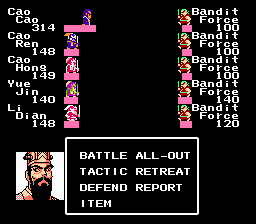
Cao Cao is a character who you never got to see except in sprite form. I generated this portrait from a few of the generic-looking strategists.
Likewise, his followers here are the generals who likely followed him against the Yellow Turban rebellion. This test involved changing a few stats around here and there, and names, but did not change any name lengths.
For those interested in a more complex Wei mod, James is currently working on one.
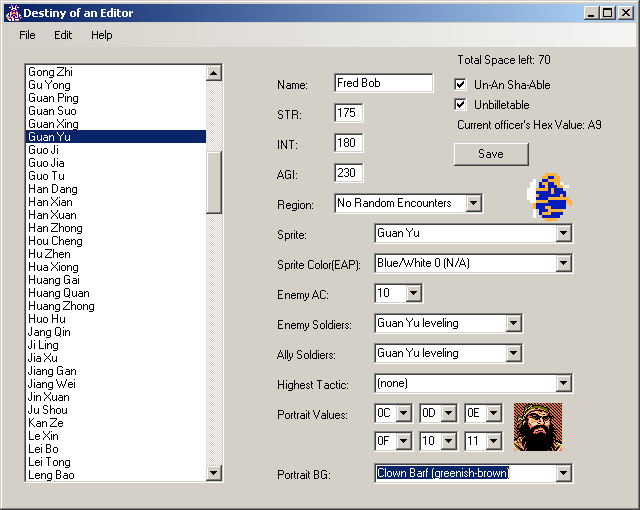
Above: The editor in action. The list of officers to the left sorts; a color sprite and portrait preview feature was added more recently thanks to a considerable amount of work on the part of James, who has also created the most complex set of changes to DOAE yet – involving manual text tweaks (something too ambitious for me), pointer updates, and semi-historical officer locations and stats.
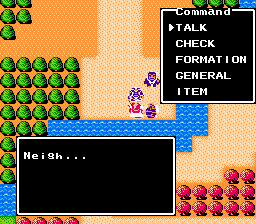
The weirdest issue I ran into was probably the set of pointers for the townspeople. By updating officer info and pointers, but not updating townsperson pointers, I ended up with some very odd-looking sprites – in one case, Song Yong and Song Ren turned invisible.
In another case, everyone in town turned into a rather bizarre red scholar-type sprite. Kind of creepy.
That’s it for now. Later on, this page may become a repository for arcane DOAE hacking knowledge. For now, if you want that, you’ll have to stop by LYS’ forum.
30 Comments »
RSS feed for comments on this post · TrackBack URI
Link Said,
December 9, 2008 @ 5:20 am
I downloaded Destiny of an Editor, but I don’t have a .NET framework. Is there any other way to use it without having a .NET framework?
niahak Said,
December 9, 2008 @ 7:14 pm
Unfortunately, there is not.
You should be able to download the .NET framework from Microsoft here.
In other news, thanks for reminding me to update the version I have posted here. I’ve never actually known how many people find it here.
Link Said,
December 10, 2008 @ 1:45 am
Well then, does the .NET framework take up much space or change anything on the desktop? You see, this is my parents’ computer right now.
niahak Said,
December 10, 2008 @ 6:49 pm
.NET unfortunately takes up about 160 MB. It doesn’t change anything on the desktop, though.
Xiang Yu Said,
December 11, 2008 @ 6:53 am
Is there a way to import your own portraits into editor? I tried using Cao Cao’s portrait from DOAE 2. I changed its bit depth value to 4 bit like the rest of the portaits and sliced it up into 6 pieces and named it just like the rest, but when I would start the game, I just kept getting Zhang Jao’s portrait.
niahak Said,
December 11, 2008 @ 6:52 pm
Ahh… unfortunately not in my editor. I’m afraid I didn’t properly explain how all that works in the documentation because it was a spur-of-the-moment addition.
That said, there *is* a relatively easy way to do it using FEIDIAN ( http://feidian.sourceforge.net/index.html ). I don’t have the numbers on-hand, but whenever LordYuanShu.com’s forums come back up I wrote a moderately detailed guide there on how to do it.
If you’re still interested, I can look into where I might’ve stored the appropriate numbers on my computer.
Although I am curious – how in the heck did you manage to get the bit-depth down to 4? I looked *everywhere* and I couldn’t find a single image processing program that was willing to do it without starting at 4-bit.
Xiang Yu Said,
December 11, 2008 @ 9:45 pm
Thanks for the response! If its not too much trouble that would be great if you could find out how you did it. LYS forums are still down, so I can’t see how you did it before.
As for your question, I used Imagebadger Image Converter (http://www.download.com/ImageBadger-Image-Converter/3000-2192_4-10322577.html).
If you want a step by step walkthrough how to use it without losing quality of picture go here (http://forums.joe.to/viewtopic.php?f=163&t=47810&view=unread) and start reading around step 8.
Link Said,
December 12, 2008 @ 3:37 am
I have one more question. The .NET framework has 22.4 MB, and can you delete it once you download it?
niahak Said,
December 12, 2008 @ 6:22 pm
Xiang Yu – I’ll email you the details. I’d post them but it’s pretty in-depth and they’ll be back on the LYS forum whenever they manage to get things back up. Thanks for the link!
Link – I’m not sure if you can uninstall it once you have it already 🙁
Xiang Yu Said,
December 12, 2008 @ 7:22 pm
Awesome! I appreciate it!
Link Said,
December 17, 2008 @ 9:37 pm
OK, I installed .NET, but I don’t know how to work things out. I filled in all the squares, but it doesn’t save!
Link Said,
December 18, 2008 @ 4:31 am
I now see the problem. COuld you give me a link where I can download just in time debugger?
niahak Said,
January 5, 2009 @ 10:29 am
Sorry Link, I had no internet connection for a couple weeks 🙁
You shouldn’t need a JIT debugger… are you remembering to save each officer once you’re done editing and to export the completed ROM afterward?
Zamza Said,
February 25, 2009 @ 11:28 pm
Is there anyway to change an officer’s AP? I moved Zhou Tai to Chang Sha and for some reason his AP jumped up to 150, which is way too high at that point in the game.
niahak Said,
February 25, 2009 @ 11:53 pm
Yes, there is. Changing an officer’s sprite color changes their AP (that’s what the numbers there are for).
I’ve also updated the link here to point to the latest version, which has several improvements. If you want faster responses to questions, though, you could try LordYuanShu’s forums (linked at the top of this page).
Zamza Said,
February 26, 2009 @ 12:00 am
Oh, thank you very much, that makes sense. And I thought that reply was plenty fast.
niahak Said,
February 26, 2009 @ 12:06 am
You got lucky, as I only check this site at nighttime 😉 LYS’ place never sleeps.
Page updated for latest release of DoaEd – it should make your life a lot easier. Also a text editing tool’s been added.
Destiny of an Emperor Yuan Shu Mod | Lord Yuan Shu Said,
April 26, 2009 @ 1:59 am
[…] No Liu Bei, Guan Yu, Zhang Fei, etc going through Destiny of an Emperor. Thanks to Niahak and his Destiny of an Editor, officers can be switched around and edited. Naturally, the first use I thought of was a Yuan Shu […]
sonic.penguin Said,
November 5, 2011 @ 10:16 am
Niahak, this is sonic penguin. LYS is down atm. Was wondering if you could ADD the hex code to the text editor in a little box. For example, Retreat they are too strong is CC i think. Would this be doable to have this “show” in the editor when selecting a certain text?
niahak Said,
November 5, 2011 @ 10:19 am
I think it would be, as long as there’s a direct link between the location of the text rom-wise and the marker for it. I’ll have to get a few sample markers (e.g. the CC you point out) to get a bearing on how that looks.
DestinyOfAnEmperor Said,
November 19, 2011 @ 12:21 pm
Haha nice, LYS was down for a little bit and sonic.penguin came here.
sonic.penguin Said,
June 13, 2012 @ 11:21 am
Having lots of crashes with the text editor atm. Ive had to manually go into the hex to change some lines. lys is down atm, but any idea if there is a fix to those JIT bugs?
sonic.penguin Said,
June 13, 2012 @ 11:51 am
A note about that, it is changing the next line of text underneath of the edited line. Once exported, and I try and reopen the game in doaeditor, I get a bunch of unknown keys… >_>
niahak Said,
June 13, 2012 @ 4:19 pm
Without more context I can’t really figure out what’s going on. I sent LYS a message, he’s working on getting the site back up.
Dragon Said,
November 27, 2013 @ 3:37 pm
Is there a way to save changes to the Pirate, Brigand, Bandit and Rebel Forces they aren’t officers just random encounters that sometimes appear with or with out a officer in the game. I tried using the current editor 0.98d you can view those but the save box doesn’t allow you to click it to save changes for them.
niahak Said,
November 27, 2013 @ 5:07 pm
I probably forgot to update the version on this site! I’m actually unable to fix it at the moment, but you can get the actual latest version on LYS forums (see the link at the top of the post). I think it’s on to .98h or so.
You can’t manually edit the forces in the editor, but if I recall right James of kongming.net put together a great hacking guide that explains how to do this.
Fake edit: actually MiDKnighT did this one:
http://www.lordyuanshu.com/forums/topic/destiny-of-an-emperor-rom-hacking-guide
Dragon Said,
November 27, 2013 @ 11:32 pm
Thank you, I found just what I needed to change was the sprite data, I found it changed it and it worked. I hope it makes it into a later version it would make it easier. Be sure to thank MidKnight for me.too. That guide is awesome. If I come out with a patch I’ll be sure to give credit. Thanks. lol
Here is the offsets
0x32803 Pirate Sprite
0x32824 Brigand Sprite
0x32846 Bandit Sprite
0x32867 Rebel Sprite
The Sprite Hexadecimal Values are here
http://kongming.net/doae/rom_hacking/sprites/
Dragon Said,
November 27, 2013 @ 11:36 pm
I forgot to say Pirate and Bandit use the same Sprite by default 3B
MasterLiuBang Said,
February 9, 2017 @ 10:18 pm
Hello
May i ask….
Have you a editor for Doae2……
It Is Long Awaited for me To have that editor
Thanks…….
niahak Said,
February 10, 2017 @ 8:28 am
I’m afraid not! I haven’t had the time to work on improvements to this one for a few years. LordYuanShu’s forums are probably the best place to look, but I don’t think anyone there has been active for a while. GameFAQs may be another good bet.